Your team already runs automated checks in CI and manual checks before each release. The World Quality Report 2025-26 by Capgemini shows a similar balance across the industry: teams automate 33% of their test cases on average, and manual checks cover the rest. So the real manual testing vs automation testing question is different: which checks belong to each type, and how can you see both in a single report? This article compares the pros and cons of QA automation vs manual testing and gives you a clear model for that decision.
When to Use Test Automation vs Manual Testing
Automate checks that run often on stable features, for example regression and smoke suites. Test manually when a check needs human judgment: new features, exploratory sessions, design reviews, and checks you run once or twice a year.
What Is Manual Testing?
Manual testing means a person executes checks and judges the results without scripts. It fits best for exploratory sessions and usability reviews.
In practice, a tester opens the application and follows a test case step by step. They compare the observed behavior with the expected result and record the outcome. Teams usually document these checks as test cases with steps and expected results, so a new tester can execute them after a short onboarding. The value comes from human judgment: a person notices a confusing label or a broken layout even when the test case omits it. Our overview of manual testing basics covers the process in detail.
You can see the difference with a payment form. A test case tells the tester to enter a card number and submit. During that check, the tester also sees that the error message appears in the wrong place and that the currency symbol displays incorrectly on a narrow screen. A script would mark the same page as passed. Manual testing also remains the cheaper option for checks you run once or twice. For example, you can verify a data migration with a manual pass in an hour. A script for the same check would take a day to write and would run only once.
What Is Automation Testing?
Automation testing uses scripts to execute checks and compare results with expected values. It fits regression suites and repeated checks that run in CI on every change.
Engineers write these scripts with frameworks such as Playwright or Cypress, and a pipeline executes them on every pull request. A typical script authenticates with test credentials and checks the redirect target. The team receives results in minutes. A suite of 500 tests can verify a release candidate faster than a tester executes ten cases manually. The strength of this approach is repeatability. A script performs the same steps in the same order every time, so results stay comparable between runs. When a check fails, the team knows the product behavior changed, because the script stayed the same.
Automation has its own costs. Scripts need maintenance after interface changes, and unstable tests produce noise that hides real defects. So each automated check needs an owner and a review cadence, the same way application code does. Automation covers many layers of the product, from unit checks to full user scenarios in a browser. If you want to map these categories first, you can read our guide on the types of automated testing.
QA Automation vs Manual Testing: Pros and Cons
The table below shows the manual testing vs automation testing differences across seven criteria. You can use it as a quick reference before the detailed scenarios below.
| Criterion | Manual Testing | Automation Testing |
|---|---|---|
| Speed per run | Slow: hours for a large suite | Fast: minutes in CI |
| Cost per run | High: tester time on every run | Low after the suite exists |
| Setup cost | Low: write a test case and start | High: code plus infrastructure |
| Flexibility | High: the tester adapts during the run | Low: changes require code updates |
| Coverage type | Depth on new and changing features | Breadth on stable, repeated scenarios |
| Human judgment | Present in every step | Absent during execution |
| Best for | Exploratory and usability checks | Regression and smoke suites |
As you can see in the table, cost makes the biggest difference in this manual vs automation testing comparison. A manual check takes the same tester time on every run. An automated check costs a lot at the start and very little later. So the number of runs decides the type. Keep a check you run twice a year manual, and automate a check that runs on every merge. Automation also has hidden costs. You pay for the pipeline and the test data, and engineers spend time on the analysis of failed runs.
Pros and Cons of Manual and Automation Testing
| Pros | Cons | |
|---|---|---|
| Manual Testing | Human judgment: a tester notices usability and copy issues that scripts miss. Low setup cost: a simple test case is enough to start. |
Slow at scale: each run takes tester time, so large suites become slow and expensive. Variable results: two testers can report different results for the same check. |
| Automation Testing | Speed: scripts return results in minutes, even for large suites. Low cost per run: each new run costs very little after the team builds the suite. |
Maintenance: engineers update scripts after every interface change. Unstable tests: flaky checks create false failures and hide real defects. |
Software Testing Manual vs Automation: When Manual Checks Win
A script gives you speed, and a person gives you judgment. Here are the scenarios where judgment matters more.
- New Features Without Stable Requirements. When a feature changes every sprint, test scripts break after each redesign. Engineers then spend more time on repairs than on new coverage. A manual pass adapts to the current state of the interface and needs zero maintenance. Once the feature settles, you can automate it with confidence.
- Exploratory Sessions Before a Release. In an exploratory session, a tester picks a risky area and investigates it freely within a time box. A charter defines the goal instead of a fixed script. This practice finds the defects that scripted checks miss, because the tester follows suspicious behavior beyond the written steps. Our exploratory testing guide explains how to structure such sessions.
- Design and Copy Review. A script can compare a screenshot with a baseline image. Only a person can tell you that a button label confuses users or that a checkout form feels too long. Reviews like this stay manual in every team, whatever the automation maturity. You can schedule them as part of the release checklist and give them a fixed time box.
- Rare and Expensive Scenarios. Some checks run twice a year, for example a yearly billing recalculation. Automation of such a check costs more than the manual runs it replaces. It makes sense to keep it manual and spend the budget on frequent scenarios.
Manual test cases also matter more in AI-assisted development, because they record expected behavior independently from the code. Our article on manual test cases in the agentic era explains this role in detail.
Automation vs Manual Testing: When Scripts Win
Now let’s move to the other side of the automation testing vs manual testing comparison. These four groups of checks belong in scripts.
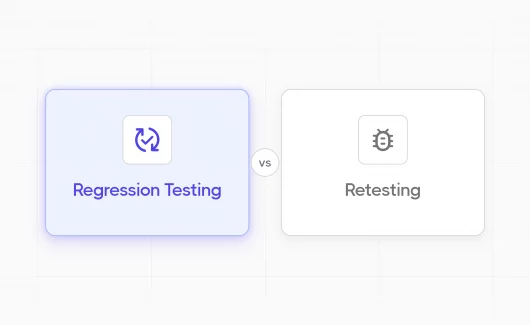
- Regression on Every Release. A regression suite proves that existing features work after new changes. It repeats with every release, so the setup cost spreads across dozens of runs within a quarter. A typical suite also grows with every sprint, so manual regression becomes too slow after a few dozen cases. Our article on regression testing key points shows how to build such a suite.
- Smoke Checks on Every Pull Request. A short smoke suite confirms that the build starts and the core flows respond. It runs many times per day. That schedule is a poor fit for a person and a natural fit for a script. Teams often gate the merge on this suite, and the main branch stays deployable. You can read more in our guide on smoke testing with examples.
- Cross-Browser Runs. The same scenario needs to pass in several browsers and screen sizes. Frameworks such as Selenium execute a scenario across browsers from a single script, while a person would spend a full day on the same matrix. You write the scenario once and reuse it for every target browser.
- API and Calculation Checks. Checks that compare JSON responses or numbers have exact expected values, so scripts execute them with higher precision than a person. They also finish in seconds, which makes them a natural part of CI.
Test Automation vs Manual Testing in a Single Run
A release gets approval when every planned check passes, scripted and manual. But in many teams, the results live in two places. Automation reports sit in CI logs, and manual results sit in a spreadsheet. Before every release, a QA lead merges the two sources into a summary. This step costs hours and introduces copy errors.
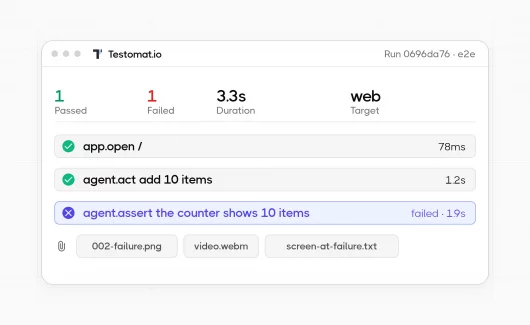
Testomat.io removes this step with mixed runs. A mixed run executes manual and automated tests together and combines the results into a single report. Automated results arrive from your pipeline through the reporter, while testers complete the manual part inside the same run.
Here is how a release day looks with this setup. The regression suite finishes in CI, and its results appear in the run within minutes. Two testers complete the exploratory part of the same run before lunch. The QA lead then opens a single report with 3 failed automated checks and 1 manual defect. The release decision relies on complete information from both types.
Here is how the workflow looks:
- You create a run and add both manual test cases and automated tests to it.

- The reporter sends automated results from your pipeline into the run. You can also start a mixed run in projects without a configured CI system.

- Testers execute the manual cases in the same run, and the report updates as results arrive.

- You review a single report where a filter separates manual from automated tests, so you can check each part separately.

You can also link automated tests to manual test cases. A scripted check then confirms the status of a documented scenario, and the report keeps a complete view of coverage.
Automation progress becomes measurable too. The Manual-to-Automated widget in Analytics shows how many tests changed state from manual to automated in a selected date range, so you can track the shift with real numbers instead of estimates. Custom notifications also send run results to Slack or MS Teams, so the team learns about failures right after the run. The mixed test execution page describes the full workflow with examples.
How to Decide What to Automate First
To make this choice for your suite, compare the run frequency of each check with the stability of the feature it covers. Two axes give you four quadrants.
| Stable Feature | Changing Feature | |
|---|---|---|
| Frequent Runs | Automate first | Automate the core path |
| Rare Runs | Automate later | Keep manual |
You need to start in the upper left quadrant. Checks that run often against stable features give the best return, for example smoke and regression suites for login or checkout. Frequent checks on changing features deserve partial automation: you can script the stable core path and keep the volatile details manual until the design settles.
The lower half of the matrix can wait. Rare checks on stable features bring little return in the near term, and rare checks on changing features cost the most to maintain while returning the least. For example, an annual compliance report check stays manual until its schedule changes.
You can score every check in your suite on these two axes during the next planning session. The exercise takes an hour for a suite of 200 cases and gives you an automation queue for the quarter. This way, the automation vs manual software testing choice becomes a planning task with clear priorities.
Our guide on test automation strategy shows how to build a full plan from this matrix.
Manual Testing vs Automation: Final Thoughts
Manual testing and automation testing answer different questions. Scripts verify that existing behavior works after each change, and people evaluate new behavior before a script exists. The QA manual testing vs automation choice is a question of placement: each check goes to the type that fits its frequency and stability. So the practical goal in manual vs automation software testing is a process where both types run together and report together. You can build this process in Testomat.io with mixed runs on the free plan. 👉 Try it on your next release.